With Xcode 8 xcodebuild uses Swift 3 to build by default. This will be great in about six months, but right now it’s somewhat of a pain. I am using Carthage as my dependency manager and all of those are using Swift 2.x still.
If you want to build your Carthage dependencies (or anything from the command line for that matter) using Swift 2.3, add the TOOLCHAINS parameter.
TOOLCHAINS=com.apple.dt.toolchain.Swift_2_3 carthage build
Update: As of Carthage 0.17 you can use a --toolchain option. This doesn’t help with raw xcodebuild obviously.
I had a fun Friday evening. I received a Slack notification sent to everyone in our group stating that the iOS app was crashing on launch. This came as a surprise to me, because our most recent release had been out for several weeks at this point. It also was the most stable release in terms of number of crashes we’ve ever released. This was a good point release.
After a few minor heart palpitations, I grab a few iOS devices and try launching the App Store version of the app. Success. No crashes for me. A few other team members launch the app successfully as well. At this point, I make a suggestion straight out of Microsoft’s 1990’s playbook: restart your phone. No more crashing on launch.
My theory was correct. I’ve seen a few times in the last few months where an app will randomly begin crashing on launch for no rhyme or reason. I’ve never really tried debugging it because it wasn’t my app crashing, but now I was annoyed. I made a point to check the iOS device console next time I saw one of my apps doing this weird crash on launch behavior.
Fast forward to yesterday when I wanted to check a few things in the Major League Baseball app. I tapped the MLB icon and . . . crash. Rinse. Repeat. I decided to go on a round-robin through my apps and see if any others are crashing. Turns out Medium, United Airlines, and Pocket are also crashing. The odds of four of these major apps all shipping at-launch crashers at once are good enough to make you rich in Vegas. At this point, I am pretty confident what’s going on but I’m not at home so I can’t easily plug my phone in and see what’s happening. I’ll just have to forgo three of my most used apps because I’m not restarting my phone yet.
Once I get home, I plugged my iPhone into my Mac, popped open device console in Xcode and tried launching the failing apps again. Here’s what spit out:
Apr 30 11:17:55 iPhone kernel[0] <Notice>: AppleFairplayTextCrypterSession::fairplayOpen() failed, error -42028
Apr 30 11:17:55 iPhone assertiond[12347] <Warning>: Unable to obtain a task name port right for pid 14063: (os/kern) failure (5)
Apr 30 11:17:55 iPhone SpringBoard[12335] <Warning>: Unable to register for exec notifications: No such process
Apr 30 11:17:55 iPhone SpringBoard[12335] <Warning>: Unable to obtain a task name port right for pid 14063: (os/kern) failure (5)
Apr 30 11:17:55 iPhone SpringBoard[12335] <Warning>: Unable to obtain a task name port right for <FBApplicationProcess: 0x13facbcf0; com.medium.reader; pid: 14063>
Apr 30 11:17:55 iPhone com.apple.xpc.launchd[1] (UIKitApplication:com.medium.reader[0x7257][14063]) <Notice>: Service exited due to signal: Killed: 9
Apr 30 11:17:55 iPhone SpringBoard[12335] <Warning>: Application 'UIKitApplication:com.medium.reader[0x7257]' exited abnormally via signal.
Apr 30 11:17:56 iPhone SpringBoard[12335] <Warning>: Application '(null)' exited for an unknown reason.
Apr 30 11:17:56 iPhone kernel[0] <Notice>: IOAccessoryManager::configureAllowedFeatures: tristar: revoking mask=0xffff
Apr 30 11:17:56 iPhone iaptransportd[12353] <Warning>: CIapPortAppleIDBus: Auth timer timeout completed on pAIDBPort:0x15cd06f70, portID:01 downstream port
Apr 30 11:17:58 iPhone kernel[0] <Notice>: AppleFairplayTextCrypterSession::fairplayOpen() failed, error -42028
Apr 30 11:17:58 iPhone com.apple.xpc.launchd[1] (UIKitApplication:com.ideashower.ReadItLaterPro[0x33c1][14064]) <Notice>: Service exited due to signal: Killed: 9
Apr 30 11:17:58 iPhone assertiond[12347] <Warning>: Unable to obtain a task name port right for pid 14064: (os/kern) failure (5)
Apr 30 11:17:58 iPhone SpringBoard[12335] <Warning>: Unable to register for exec notifications: No such process
Apr 30 11:17:58 iPhone SpringBoard[12335] <Warning>: Unable to obtain a task name port right for pid 14064: (os/kern) failure (5)
Apr 30 11:17:58 iPhone SpringBoard[12335] <Warning>: Unable to obtain a task name port right for <FBApplicationProcess: 0x13fed4190; com.ideashower.ReadItLaterPro; pid: 14064>
Apr 30 11:17:58 iPhone SpringBoard[12335] <Warning>: Application 'UIKitApplication:com.ideashower.ReadItLaterPro[0x33c1]' exited abnormally via signal.
Apr 30 11:17:59 iPhone SpringBoard[12335] <Warning>: Application '(null)' exited for an unknown reason.
Apr 30 11:18:03 iPhone kernel[0] <Notice>: AppleFairplayTextCrypterSession::fairplayOpen() failed, error -42028
Apr 30 11:18:03 iPhone com.apple.xpc.launchd[1] (UIKitApplication:com.united.UnitedCustomerFacingIPhone[0x620b][14065]) <Notice>: Service exited due to signal: Killed: 9
Apr 30 11:18:03 iPhone assertiond[12347] <Warning>: Unable to obtain a task name port right for pid 14065: (os/kern) failure (5)
Apr 30 11:18:03 iPhone SpringBoard[12335] <Warning>: Unable to register for exec notifications: No such process
Apr 30 11:18:03 iPhone SpringBoard[12335] <Warning>: Unable to obtain a task name port right for pid 14065: (os/kern) failure (5)
Apr 30 11:18:03 iPhone SpringBoard[12335] <Warning>: Unable to obtain a task name port right for <FBApplicationProcess: 0x13fa60dc0; com.united.UnitedCustomerFacingIPhone; pid: 14065>
Apr 30 11:18:03 iPhone SpringBoard[12335] <Warning>: Application 'UIKitApplication:com.united.UnitedCustomerFacingIPhone[0x620b]' exited abnormally via signal.
Apr 30 11:18:03 iPhone SpringBoard[12335] <Warning>: Application '(null)' exited for an unknown reason.
Apr 30 11:18:07 iPhone syslogd[12297] <Notice>: ASL Sender Statistics
Apr 30 11:18:07 iPhone kernel[0] <Notice>: xpcproxy[14066] Container: /private/var/mobile/Containers/Data/Application/C1AEAFEE-6FDD-46F1-BBAB-F3E345D35EB9 (sandbox)
Apr 30 11:18:07 iPhone kernel[0] <Notice>: AppleFairplayTextCrypterSession::fairplayOpen() failed, error -42028
Apr 30 11:18:07 iPhone com.apple.xpc.launchd[1] (UIKitApplication:com.mlb.AtBatUniversal[0x37dc][14066]) <Notice>: Service exited due to signal: Trace/BPT trap: 5
Apr 30 11:18:07 iPhone ReportCrash[14067] <Notice>: Formulating report for corpse[14066] AtBat.Full
Apr 30 11:18:07 iPhone SpringBoard[12335] <Warning>: Application 'UIKitApplication:com.mlb.AtBatUniversal[0x37dc]' crashed.
Apr 30 11:18:07 iPhone ReportCrash[14067] <Warning>: Saved type '109(109_AtBat.Full)' report (3 of max 25) at /var/mobile/Library/Logs/CrashReporter/AtBat.Full-2016-04-30-111807.ips
The big thing that points out to me is this line:
Apr 30 11:18:07 iPhone kernel[0] <Notice>: AppleFairplayTextCrypterSession::fairplayOpen() failed, error -42028
Fairplay is the DRM Apple uses for App Store (and iTunes purchases in general). Something is going wrong with the DRM on these apps causing them to fail to launch. Confidence inspiring!
This is as far as my investigation has taken me at this point. I don’t really have a theory what is causing this. My first thought was it was caused by an app being updated, but the United app hadn’t been updated in a while and it was crashing for no reason. I am mostly writing this up because when I was trying to defend that this was an iOS issue and not a bug in our code, I really didn’t have much of a source to cite other than the few tweets I remembered seeing from other folks running into the same issue. I’d love to know more if you have any theories.
Apple folks, have a radar: rdar://26032481
My main project these days bundles Google’s GoogleCast / Chromecast framework in it to allow users to stream video content from their iOS devices to Google’s little streaming sticks. Overall, I like the Chromecast devices. They seem to work a bit more reliably than Airplay in a lot of ways. What I don’t like, however, is the framework that Google provides for iOS to enable casting support in third-party apps.
We have had the framework in our git repository for the last year without much issue. Only recently did we try to update to the latest version (2.10.4 as of this writing) that the issues started to really pop up. Seemingly overnight, the GoogleCast framework ballooned from 17MB to 439MB. That is not a typo. It really did grow 25x in size. I opened an issue and Google is quick to blame Bitcode for the issue, though I’ve never seen a framework grow 25x. So our app is now a little bigger because we have this giant framework embedded in our project. No big deal, right?
The problem is that we use GitHub for our version control system and it has a hard limit of 100MB for a file size that can be pushed to a repository. If it’s over that 100MB size, the file is rejected and GitHub suggests adding it to GitHub’s Large File Storage system. Git-LFS is an extension to the Git protocol that replaces giant files like a 439MB iOS framework with a pointer to a location on a remote storage location that is better designed to house such large files (think Amazon S3).
Easy fix, I thought. I installed the Git-LFS extensions and tried adding the GoogleCast framework to LFS, but was met with an error:
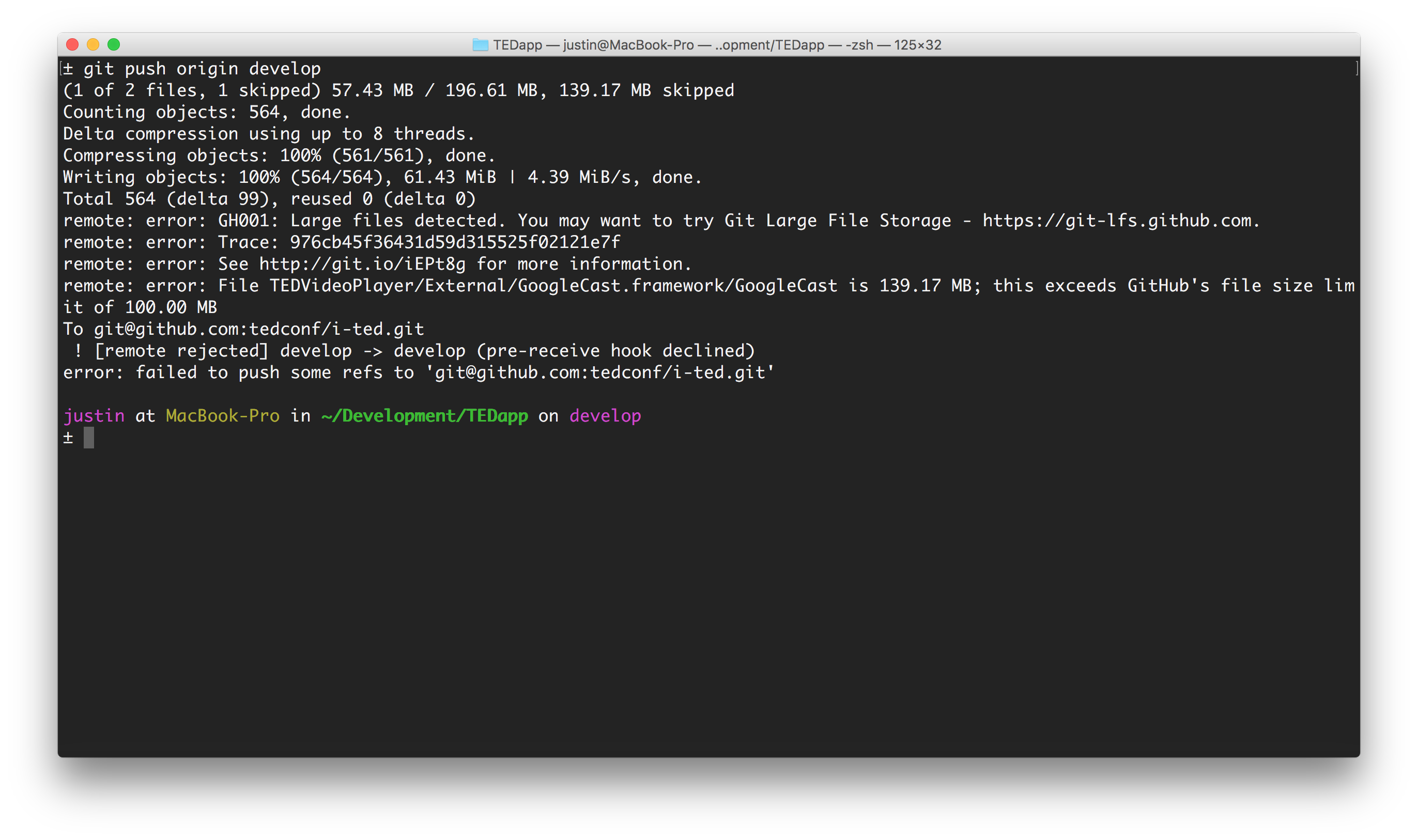
Long story short, to get a file on GitHub LFS it has to have zero history in your repository. Otherwise, the pre-push hook won’t recognize it as an LFS file and you’ll be in a jam. GitHub has a page that explains this and how to get around it. It took a bit of trial and error for me still to get GoogleCast to behave with Git LFS. These are the steps I went through in Terminal:
1. Analyze The Damage
Using gitk I was able to see how far back and how many commits were around with the GoogleCast Framework as a part of it. To get gitk working on El Capitan, however, you need to update the copy of tcl through Homebrew.
brew cask install tcl
gitk --all -- External/GoogleCast.framework
In the output you should see the commits that include the GoogleCast framework and its children inside.
Sweep It All Away
Here comes the painful part. You’re going to need to go through and remove every reference of the file in your repository history on every branch and tag. You’ll then need to force push the changes to your repo, which is always a little scary. There’s two ways to do this: git filter-branch or a third-party tool called BFG Repo Cleaner. The BFG is supposed to be faster, but I was unable to get it to successfully work for what I was trying to accomplish, so I went the slow and time consuming route.
You’ll need to repeat this on every branch you have open in your repository. Grab a drink:
git filter-branch --force --index-filter 'git rm -rf --cached --ignore-unmatch External/GoogleCast.framework' --prune-empty --tag-name-filter cat -- --all
This will go through and remove the GoogleCast framework files from every commit in your history. After you’ve finished cleaning up a branch you can run gitk again with this command to ensure it’s no longer in your history:
gitk -- External/GoogleCast.framework
Clean Up
After this, it’s probably worth running the Git garbage collector.
git gc --aggressive --prune=now
And finally, you’ll want to force push all your changes back to your repository.
git push origin --force --all; git push origin --force --tags
On to LFS
Now that we’ve got a cleaned up copy of the repository on GitHub, we can finally start re-adding the GoogleCast framework back to your repo and making sure its under LFS. Go ahead and add a fresh copy of the GoogleCast framework and xcassets files to where you previously were storing them. Make sure your app builds at this point just for safety.
First we need to install the Git LFS pre-push hook in our repository:
git lfs install
Next, we’ll go ahead and tell LFS about our oversized GoogleCast files.
git lfs track External/GoogleCast.framework/Versions/A/GoogleCast
git lfs track External/GoogleCast.framework/Versions/Current/GoogleCast
git lfs track External/GoogleCast.framework/GoogleCast
You’ll notice I am doing this three times. For some reason only known to Google they are bundling the same 139 MB binary three times in their “framework” so you have to make sure you hit all three instances of it.
Commit all your changes, including the new .gitattributes file additions that were made to track the new oversized GoogleCast files. You should now be able to push your changes to your master or develop branch and have the oversized files added to GitHub’s LFS system.
Finally you can go back to getting actual work done.
I can’t say enough good things about this Android commercial ad that played a few times during the Oscars.
Stephen Wilkes is a professional photographer who gave a talk at TED last week on his day to night photography project. Wilkes sets up at a location for an entire day or more capturing the same shot repeatedly. He then heads back into his studio and stitches the moments together into single photograph that captures the activity of that location over a single day. The photos are incredibly mesmerizing.
I probably will have more to say about my experience at TED. Probably.