There is zero point to this post. I’m only writing it in case someone else runs into this issue. Hopefully they don’t have to spend as many hours as I did to debug this. Maybe someone can also explain why this was an issue in the first place.
For the last six months or so I have been unable to use Netflix on any iOS or tvOS device (version 10.x at the time of this writing). I could sometimes get my list of content to load, but any attempt at playback failed with generic Netflix errors. Even signing into my Netflix account would be a chore. If you search the Netflix support site they offer the basic unhelpful support information: have you tried restarting your device or router?
I have a CenturyLink Gigabit fiber line, so hearing that it might be an issue with my connection seemed wrong, especially when you consider that I use a variety of other streaming services without issue. The other questionable thing is that Netflix does work on any non-iOS device such as my Xbox One, TiVo Bolt, and (gasp) Android phone. Any device with a fruit logo, however, was a no-go.
My home network setup isn’t super complex, but it’s also not a stock setup either.
CenturyLink’s fiber line comes into the house and is routed through a Technicolor C2000T modem. This is in bridge mode so it merely acts as a passthrough.
For routing and WiFi I have a Netgear AC5300 Nighthawk X8. You might be wondering why I don’t take the C2000T out of the equation and just use PPPoE with this. I tried, but there is something with that C2000T that enables full speed. I couldn’t get above 500/500 speed with just the Nighthawk in play.
iOS and tvOS devices are all connected via WiFi. iMac and random Internet of Things devices are plugged into the router via Ethernet.
What I tried and What Actually Worked
My first thought was maybe it was some sort of Quality of Service (QoS) issue with the router. I checked and I didn’t have any QoS settings enabled. Just as an experiment I tried turning them on. Still no Netflix on iOS or tvOS.
My next experiment involved trying to put my tvOS devices as the DMZ host so they had a straight passthrough from the router to the open Internet. My hope was that maybe whatever is going on in the router that was filtering the Netflix connection would just be bypassed. Hopes dashed. Still nothing.
My last idea was based off a random guess, but turned out to actually work: I disabled IPv6 on the Nighthawk. Success!
I have no idea what issue is with the chemistry between Netflix, Apple’s network stack, my router, and IPv6. All I know is that I can now watch Black Mirror.
Update: Maybe it has something to do with IPv6 being blocked by Netflix’s war on VPNs?
I am mostly retired from the public speaking circuit. I do still make a point to try and do 360iDev in Denver each year, considering the proprietor is a friend and I can sleep in my bed every night of the conference. This year I did a talk that was a departure from my last few years of Auto Layout talks. Instead, I did a walkthrough of how I architect modern iOS apps. If you attended the conference and saw the talk, I hope you enjoyed it. If you didn’t attend, it’s already online and ready to watch.
The “What’s New in Auto Layout” talk seems to be becoming an annual tradition at WWDC. I didn’t attend in person this year, because I couldn’t get out of San Francisco fast enough on the Friday of the conference, but I recently sat down and watched the video and have been thinking about what Apple is offering this year.
This year’s session was surprising, to say the least. After spending the last three years preaching that autoresizing masks weren’t long for this world, Apple went ahead and made me eat a full serving of crow by “introducing” a new feature in Xcode 8 called “autoresizing masks.” For those new to Mac and iOS development, autoresizing masks is the “old” way of doing things before Auto Layout was introduced back with OS X Lion. Instead of explicitly setting relationships between your views, you set the springs and struts values to assign the resizing and pinning behavior of the view.
Even with Auto Layout, springs and struts never really went away. When the system unable to determine the layout of your application with your given set of constraints, it would plug in its own set of constraints implicitly, usually tied to springs and struts, to fill in the gaps. Any time you call translatesAutoresizingMaskIntoConstraints on a UIView you are opting out of letting the system create constraints for you based off autoresizing masks as well.
With the new incremental adoption policies in iOS 10 and above, Apple is now stepping back its hardline on Auto Layout adoption and instead realizing that in some scenarios, the old way can actually can be better. Specifically, if you just need to set up some basic resizing behavior opting into letting the system add its default constraints at compile time with a little help from your defined autoresizing masks is less work than manually creating constraints yourself. In a lot of ways it feels like a more pragmatic middle ground between the old way of doing things and the 100% pure Auto Layout approach.
Resizing masks are still not without their tradeoffs: if you are dealing with localization you’re going to want to opt into Auto Layout and all that is has to offer. I just localized an entire app and it would have been far more hellacious if I was sticking to autoresizing masks instead of Auto Layout. But, for things like fast prototypes or the most basic of views with minimal behavior requirements not having to set up constraints could definitely save you some development time.
I’ve spent the past couple days cleaning up some code to work on iOS, macOS, and watchOS. One thing I constantly struggle with is keeping the values I need from TargetConditionals.h in my head for when I want to #if branch a segment of Objective-C code for a specific platform.
So . . . I made a table.
Current as of: iOS 9.3, tvOS 9.2, watchOS 2.2, macOS 10.11
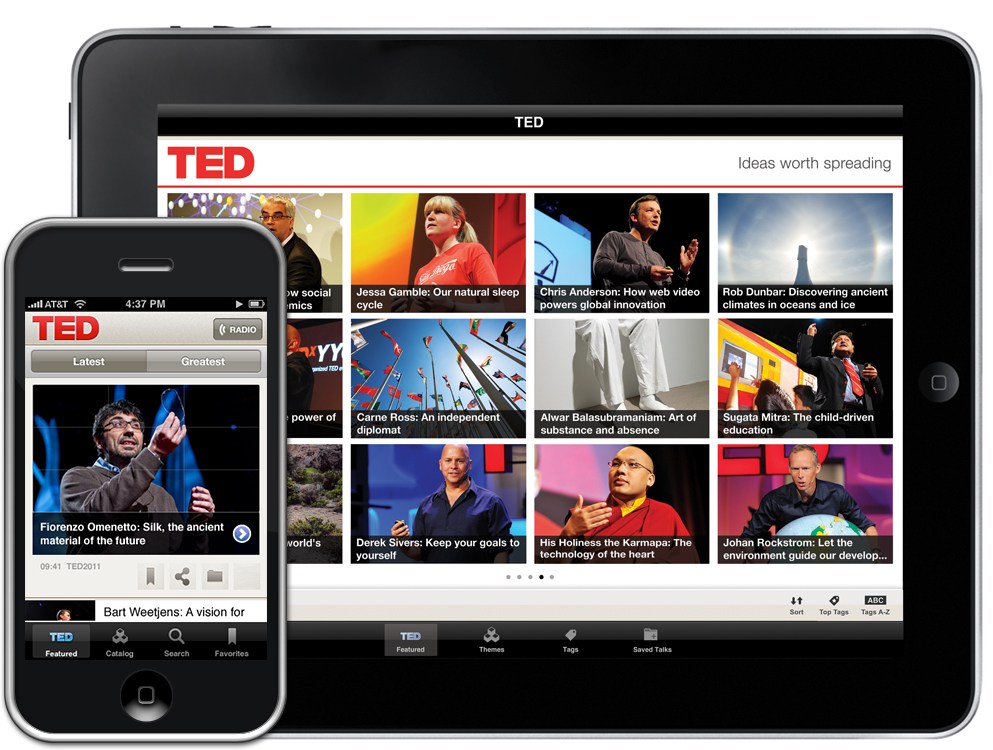
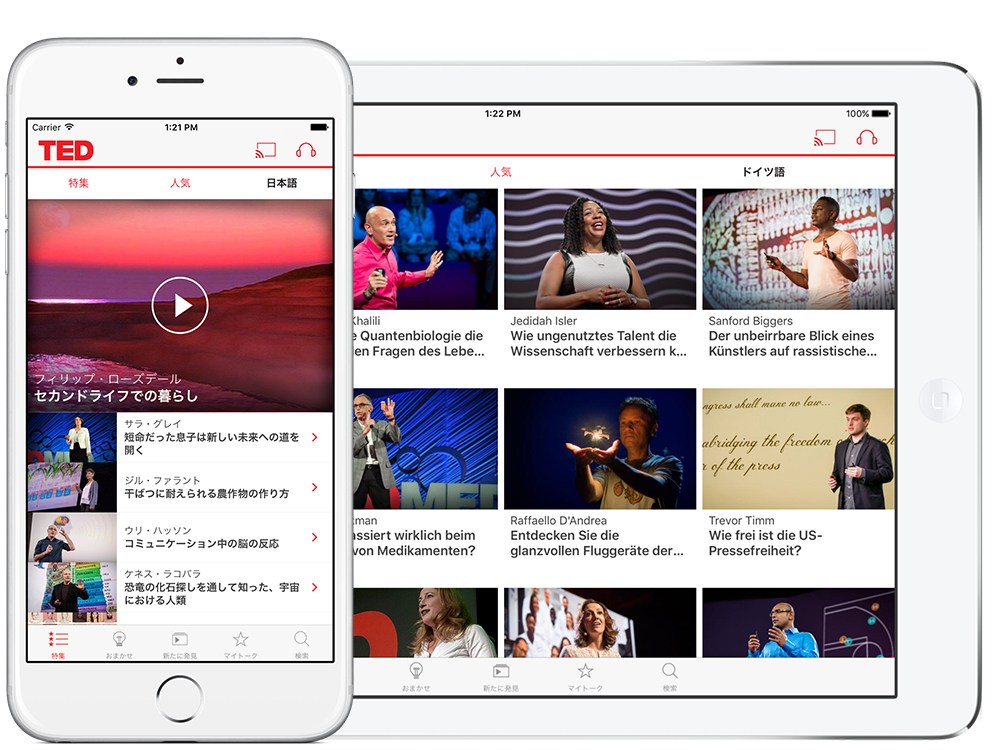
I don’t talk often about the work I do to keep the lights on at my house, but I have spent a good portion of the last four years working on the TED for iOS app. The 3.0 release is the biggest release we’ve undertaken at TED in terms of scope and amount of changes to bring it to a head. The marquee feature is the app is now localized in 20 new languages. Users all over the world can now experience TED in their native languages from Arabic to Turkish.
Behind the scenes we have been planning to localize the app for over a year. What took so long?
A History Lesson
TED for iOS first arrived on the App Store in October of 2010, and was released exclusively for the original iPad. TED for iOS 1.0 was designed to run on iOS 3.2. For the last six years we have been building on on this foundation as devices and capabilities for Apple’s platforms change. In my time at TED (September 2012 to present) I’ve seen:
Retina graphics, 3x graphics, and eventually vectors.
AVFoundation making it easy for us to do our own custom video player (my first TED project!).
The introduction of ARC as a replacement for manual retain/release.
XCTest replacing OCTest.
Larger and smaller devices such as the iPad mini, iPad Pro, iPhone 5, iPhone 6, and iPhone 6 Plus.
Auto Layout and size classes for bringing some sanity to managing all these new device sizes.
App extensions for things like widgets and custom share actions.
When TED shipped back in 2010 it was written entirely in Objective-C and designed to work on two device sizes: the iPhone 3GS and original iPad. Now we support phones as small as the iPhone 4s up to iPads like the 12.9″ iPad Pro. In that entire time, we have continued to update the same app code base. There has never been a full-on rewrite of the iOS project, as tempting as it may be at times.
Renovating The House You Live In
Early last year, I took over as the lead developer of TED and began to dedicate more time to it than anyone had in previous years (TED has always been at most 2 part-time developers, and sometimes just 1). This allowed us to shift our mindset from maintaining the existing app to keep the wheels on while adding features occasionally to trying to be more ambitious with mobile goals. The only problem was that a lot of our code was showing its age. I made a list of high level goals to modernize the app going forward in small chunks so that we could still continue to ship updates to make TED HQ happy, while I eliminated many of the things that kept me up at night.
The first of those projects was to modularize the app. Since we are a small team, and have a fairly engaged group of users who upgrade quickly, we jump on the latest version of the iOS SDK faster than most companies. I set our minimum SDK to iOS 8 and began to break the app down into separate components. Instead of a single Xcode project with all our code in it, we broke it into separate dynamic frameworks:
TED: the main iOS app
TEDData: data layer and business logic related classes
TEDVideo: our custom video player
TEDCore: shared code that is used between all of the different frameworks
By modularizing the code, it made it easier to start adopting unit tests for pieces of the code that had never sniffed XCTest in its life. It also helped the workflow so I could only try compiling TEDData if I was working with the data model exclusively, rather than having to wait and compile the entire app.
Adopting Adaptivity
When I found out that localizing the app into 20 languages was high on the list of priorities for TED, I made it pretty clear that the current foundation that the app lived on would not be capable of supporting it in a way that would allow the development team to be successful. Nearly every piece of code in the application was duplicated for both the iPhone and iPad. Up until earlier this year when you would launch the TED app on your iPhone, we would fork off to a different set of interface elements depending on if you were on an iPhone or iPad. So, for example, our Featured tab had FeaturedViewController_iPhone and FeaturedViewController_iPad with completely separate interface elements. On top of it, none of this interface code had been updated for Auto Layout, size classes, or Storyboards. In fact, most of it hadn’t been touched in years other than the occasional bug fix.
This was by far the most painful part of the app and took several months (you can see the gap in our releases last fall.) to not only consolidate down to a single UIApplicationDelegate, but also to consolidate and clean up the TED interface as much as possible using size classes, Auto Layout, and Storyboards.
We shipped all of this work in late January as part of TED 2.6. You likely didn’t notice a thing had changed if you used the app, but that was by design. Our metric for success was the user not noticing anything had changed. Internally, however, the entire app had been built up on a new foundation that would enable us to move a lot faster and move closer to localization.
Adopting Swift
As of version 3.0, about 20% of the TED code base is written in Swift. That is up from 0% at this time last year.
The first bits of Swift code we wrote were part of the adaptivity cleanup when I rewrote the entire ‘Surprise Me’ tab in Swift as a test case to see how it would go. You’ve heard the success stories before, so it should come as no surprise that I was a big fan. Not only was the code more concise and easy to read, but there was a lot less of it.
I’m pragmatic when it comes to adopting Swift in TED. If we need receive new designs for an existing feature, we go through the process of rewriting the code in Swift. If we encounter some Objective-C code that isn’t a candidate for a rewrite, I do take the time to add nullability attributes to it so that it behaves better when we are calling it in Swift, which makes the entire mixed code base experience much more pleasant.
I lose zero sleep over the lack of dynamism in Swift.
Tests and CI
The last component of our maturation as a mobile development team is building out our test suite and getting it running automatically as part of continuous integration. All commits are now automatically running our test suite on our CI server to make sure that we don’t add any regressions. Most (not all) new code is also being written with automated tests attached to it. We still have a major gap when it comes to integration and UI testing, but we’ll get there eventually.
One example where we are having great success with our test suite is when it comes to working with localization. There are several edge cases we need to handle when it comes to mapping Chinese language codes between iOS and the TED API. We automate all of that using XCTest, which makes it super easy to understand the intent of the code without having to run the app and step through the debugger.
The Localization Process
This entire modernization process took place off-and-on from January of 2015 to April of 2016. The actual process of localizing the app took place in the last four weeks. Since we went through the work of getting the app running on Auto Layout in as many places as possible, exporting and importing our xliff files meant that we had a minimal amount of interface work to do when it came to testing the actual interface. The biggest hassles turned out to be adjusting a few buttons to support multi-lines for more verbose languages like German.
I was admittedly shocked that this worked as well as it did, but it’s a testament to the work we put in building up to this actual release. 16 months of preparation for 4 weeks of work!
tl;dr
You don’t have to rewrite your legacy app from scratch.
Don’t fall too far behind Apple’s current functionality or you will pay for it, eventually.
Swift is great, but Objective-C is just fine too.
Localization is way easier with Auto Layout and size classes.
Unit testing and CI are worth it.
There’s still a ton of work to be done both internally and externally to bring the TED app to where I want it to be, but I’m pretty pleased with the work that we put in to get to this 3.0 release. I hope you’ll check it out