One of the least sexy features of iOS 8’s new developer SDK may in fact be its most important: size classes.
A History Lesson
When iOS was first introduced, we had one device: the iPhone. It had a 320×480 pixel screen and it came in any color you liked, as long as it was black. Even in this single iteration, it supported two orientations: portrait and landscape.
Designing an app that supports two orientations isn’t always as simple as letting views stretch and resize like Mobile Safari or Messages do. In a lot of cases, buttons and other controls need to be moved around to better take into account the altered sizing of landscape (480×320).
Fast forward several years later and we’ve got retina displays, iPads, and 5″ iPhones. Oh and all those devices also support multiple orientations of course.
The current/old way of solving this problem has been a mix of listening for orientation changes in your view controllers and custom views, as well as using multiple Xibs or Storyboards.
Let’s say I was building a universal version of Glassboard that supported the iPad. With iOS 7 and older, I would need to create a secondary Storyboard that had each of my view controllers re-established, its outlets redone, and its target/action sequences reconnected. Duplicate work. Any seasoned programmer knows this isn’t ideal. Having to make the same change in two different places sucks.
Now, let’s add in the areas where I wasn’t necessarily using a Storyboard or Xib. There are likely going to be checks in the code to detect orientation and device size so that I can adjust my constraints or frame-based layout code (like an animal) manually.
Your code is likely littered with a lot of this:
Size Classes
Obviously the above is not ideal, and it’s likely only going to get worse as Apple introduces new devices going forward.
WWDC is a wonderful opportunity to read tea leaves and see where Apple is going by their new APIs and how hard they are pounding concepts into your heads each year. In addition to pushing Auto Layout this year, you also saw many instances of a resizable iOS simulator and a new technology for handling all this crazy idiom and orientation stuff: size classes.
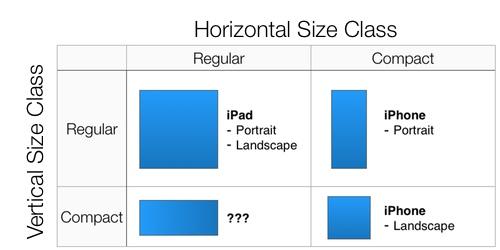
A size class is a new technology used by iOS to allow you to custom your app for a given device class, based on its orientation and screen size.
There are two goals with size classes:
To get developers and designers out of the habit of thinking in terms of specific devices, and instead thing of a more generalized approach.
To plan for the future.
The first one obviously leads to the second. You’ve no doubt seen the countless rumors that the iPhone 6, 7 or whatever is going to be a larger device. You’ve probably heard that Apple is working on wearables. Guess what will make developing for these new devices easier? Size classes.
There are presently four size classes.
Horizontal Regular
Horizontal Compact
Vertical Regular
Vertical Compact
At any time your device is going to have a horizontal size class and a vertical size class. Together, those are what is used to define which set of layout attributes and traits to show the user on screen.
Traits
The horizontal and vertical size classes are considered traits. Together with the current interface idiom and the display scale they make up what is called a trait collection. This doesn’t just include where on screen specific controls should be placed.
Traits can also be used for things like image assets, assuming you are using Asset Catalogs (remember when I said to use the new stuff Apple introduces?). Instead of just having a 1x and 2x version of your asset, you can specify different image assets for a horizontal and vertically compact size class, as well as one for horizontally regular and vertically compact. In code, it still looks like the same UIImage call. The Asset Catalog takes care of rendering the appropriate image basd on the current trait collection.
Designing For Size Classes
Size classes are a nice addition for developers because it helps simplify the development experience when we want to support multiple devices and orientations. By making our job easier, Apple can more easily introduce new device sizes and sell developers on making their apps universal rather than just being an iPhone only product.
The biggest change for us developers is redoing our orientation code for the third or fourth time since iOS was created. We’re developers. We’re used to it.
For designers, trait collections means thinking less about the specific device you are designing for and instead thinking about the attributes of that device. The biggest attribute designers think in terms of now is physical screen size. Their mockups are pixel perfect for 320×480, 480×960 and the like.
Designing for those scenarios is no longer tenable as we move more towards a world where not every device is guaranteed to have the exact screen dimensions your Photoshop or Sketch mockups account for. Instead, the goal should be thinking about designing in the general sense for the class of device, which is presently:
Portrait Phone
Portrait Tablet
Landscape Phone
Landscape Tablet
If an iPhone 6 comes along and it has a bigger screen, my guess is that it’s going to have the same trait collections as the existing iPhone 4s and 5. Sure, the dimensions of the device will be bigger than the existing phones, but the UI should adaptively handle those changes based on your already defined interfaces for those specific trait collections.
This is likely the point where the designers have flipped over their bamboo work benches, but it’s the reality. Just like software development, software design is about adapting to the constraints. The new constraint is that we no longer have a world where we’re building towards a specific screen size. We’re not approaching Android levels of craziness, but this absolutely preps us for where Apple is headed.
Adopting Size Classes
The good news is that Interface Builder makes working with size classes easy. The better news is these Interface Builder changes are backwards compatible so you can simplify and consolidate Storyboards and Xibs where appropriate without leaving behind any legacy users.
The not so good news is that if you want to work with trait collections in code, it’s iOS 8 only. This shouldn’t come as a shock as Apple rarely backports new APIs to legacy versions of the OS. What it does mean is that you’re going to have to add some additional branching in your code to account for when you want to, for example, adjust the intrinsicContentSize of your custom UIView. If the device is on iOS 8, you can use the horizontal or vertical size class to help determine that value. If the device is still on iOS 7 or whatever, the existing code you’re using will have to remain deployed.
Since I use and recommend Interface Builder, my work load is significantly less than those that are still living by the “write everything in code” mantra. If you find yourself still in that camp, I’d highly recommend using iOS 8, Xcode 6, and trait collections as an opportunity to get on the Interface Builder bandwagon. It’s not only going to lessen the amount of boilerplate code you have to write, but it’s also going to simplify your code base by extracting out a lot of the trait handling into a visual UI.
Let’s imagine there is someone out there who watched last week’s WWDC keynote and thought to themselves, “This is it! Now! Now is the time for me to learn to program and build an iOS app!”
Nevermind that they are about 6 years late to gold rush, it’s an exciting proposition. Programming is fun! I come from a family of builders. The only difference between my father and grandfathers is they built homes with hammers. I sit in front of a keyboard all day typing and looking at cat GIFs.
I digress. You want to learn to be an iOS developer. What are you supposed to do? Aaron Hillegass (whose books I credit with teaching me this stuff way back when he was the only person writing about Cocoa development) says you should learn Objective-C. Ash Furrow and a few others say you should learn Swift because Objective-C is too hard.
Guess what? It doesn’t matter what language you want to learn.
If you want to be an iOS developer you realistically have four options:
Objective-C: old faithful.
Swift: New hotness.
Xamarin: The crazy kids in the corner who want to use C#.
RubyMotion: Know Ruby? Tired of arguing with DHH about whether tests are dead? You too can build an iOS app.
I’d lean towards choosing one of the first two options because they are first-party solutions provided directly by Apple, but the language you choose to learn matters little compared to learning the frameworks. The Cocoa Touch frameworks have always been the secret sauce. Whether you’re using Objective-C, Swift, C#, or Ruby you’re still going to have to learn how to use a UIButton and a UITableView.
Will you be more of an iOS developer because you took the time to learn Objective-C and it’s 20+ years of history versus Swift and its eleven days? Nope. Your customers care about what’s on the surface of your app: does it look, interact, and feel like an iOS app. If you can do that, the language doesn’t matter.
There is no right answer to this question. Choose what the language that speaks to you and then go build something awesome.
My confidence in the iOS platform has been waning over the last 12 months. iOS 7 was a hard upgrade to swallow both in terms of the changes and the work it brought. A questionable visual refresh, but few improvements to a core experience that finally felt behind what the competition was offered.
My time with C# and Azure showed me the sharp edges in Objective-C that I wasn’t fully aware of before. It’s not that Objective-C is a bad language (it’s pretty great), but it’s also built on a foundation that makes things that should be simple not so simple.
Even the developer tools were lacking. The iOS publishing and beta experience has been laughably bad for years, especially compared to what Google offers Android developers.
And then in two hours, Apple shut me up. They pretty much offered a solution for every single thing I have bitched about over the past five years. Extensions, CloudKit, a new iTunes Connect. And Swift, an entirely new programming language that will likely power the future of iOS and OS X development for years to come.
I came into this years WWDC fairly mellow to what would or wouldn’t be announced. There wasn’t any anticipation or excitement the night before. Just a standard amount of curiousity. After the Keynote, I can’t remember being that excited since the announcement of the original iPhone. They blew the roof off Moscone.
With my entire list of complaints about the Apple platform resolved, what am I supposed to complain about now? I have spent the better part of the last week thinking about an entirely new list of things for Apple to work on these next five years, so that I can both continue to have something to nitpick and because I truly believe they will enhance the platform in meaningful ways.
A Global Accounts System: Authenticating with your Facebook or Twitter account on iOS is as simple as accepting an alert view pop-up. Authenticating with Foursquare, Glassboard, or any other third-party auth provider requires either manually entering passwords or using a URI scheme to jump between apps. Being able to set any third-party service as an auth provider a la Twitter or Facebook would benefit all users of those services. (Radar: 17226236)
async-await: Swift is wonderful until you have to create a dispatch queue. Then you remember that concurrency is still way too hard on Apple’s platforms. C# has solved this in a meaningful way with their async-await keywords that make asynchronous programming incredibly simple. (Radar: 17226224)
Better Refactoring Tools In Xcode: Xcode 6 is a wonderful update, but its ability to refactor code in meaningful and reliable ways still lags severely behind Android Studio and Visual Studio.
Token-Based APNS: The certificate dance that you have to jump through to work with Apple’s Push Notification Server is horrendous when compared to other solutions. Being able to register for a secret token and use that to authenticate is far simpler to integrate than the certificates and provisioning profiles needed presently. (Radar: 17226189)
CloudKit REST Endpoints: CloudKit is designed to excel on iOS and OS X, but there are server-side scenarios where it would be beneficial to be able to hit a CloudKit end point and pass data to a user’s account, or register a silent push based on a third-party data source hosted remotely. (Radar: 17226182)
Default Apps On iOS: With great third-party apps that are offering full replacements for standard apps like Safari, Mail, and Calendar, it’d be ideal to be able to associate them with iOS so if I use Mail and tap a link I can have it open in Chrome, my preferred iOS browser. (Radar: 17226170)
The ski bum of the iOS development community Kirby Turner wrote up how he using Auto Layout and was lucky enough to get a large audience for it through iOS Dev Weekly. I’m happy to see that Kirby is embracing Auto Layout. I did take issue with the premise of his article though: that he is writing all of his constraints in code rather than using Interface Builder.
It’s totally possible to do this, and there are situations where I do it as well. Small views with a few basic constraints are usually quicker and easier to write without a Xib. Insanely complex views such as the [TED video player] I wrote and maintain are also too heavy for a straight Xib implementation.
For pretty much any situation outside of that? You are doing yourself a disservice avoiding Interface Builder now that we are switching to using Auto Layout rather than springs and struts.
Why? Allow me to share a few reasons.
Instant Ambiguity and Conflict Checking
When you are defining the constraint-based relationships between your views in Interface Builder, you get real-time feedback in the Xib or Storyboard’s sidebar. If you see a yellow circle, there’s likely a misalignment. It’s a warning. If you see a red circle, there’s either a conflict, ambiguity, or some other issue that is going to cause pain when you build and run.
If you write all your constraints in code, you don’t find out about these sorts of issues until you run the application and get hit with an exception.
Code Is A Liability
The less code I have to manage, the better. Not only do Xibs and Storyboards let me visually lay out the main components of my interface, I can also define the attributes on them without having to type out more code. That’s something we have always had.
Now with Auto Layout, we can also define our constraints in the same Xib files rather than having to sprinkle bits of code all over our projects. Every line of code you write now is a line of code you have to manage six months from now. I’d rather have less management personally.
You Suck At Typing
One of Auto Layout’s best features is its ASCII syntax for defining multiple constraints quickly. There are legimitate times where you don’t want to or need to lay out your constraints in a Xib. It’s not without fault though.
Let’s say you want to lay out a constraint with NSLayoutConstraint‘s constraintsWithVisualFormat:options:metrics:views method. Everything you type into the constraintsWithVisualFormat section has zero checking of its syntax. It’s just yet another string literal to Xcode. The only way you will know that you screwed it up is to run the app and see what crashed.
Apple could theoretically fix this in the future, but as of Xcode 5.1 you have to be a perfect typist. I’m far from perfect.
Visual Layout
From a learning perspective, I truly believe the best way to begin to understand and use Auto Layout is through Interface Builder. I’m a visual learner, and being able to lay out my views and then see a visual representation of the constraint relationships between two views is killer for fully understanding what the new layout system is doing.
By writing everything in code, you are putting yourself behind the eight ball before you have even gotten started. I’d put money on the fact that most people that try Auto Layout and then ditch it either haven’t touched Interface Builder since Xcode 4 (which sucked) or are trying to do all their Auto Layout work in code.
Summary
Interface Builder’s Auto Layout support isn’t perfect. There’s plenty of things I’d love to see Apple change, but writing all your constraints in code only should be the exception, not the norm.
If you’re still struggling with Auto Layout, be sure to check out my Auto Layout Resource page.
By now you may have heard that App.net, the upstart social network/platform/data layer, is entering maintenance mode after the company laid off their team when renewals weren’t as high as they’d hoped.
I’ve been a founding member of the ADN movement since 2012 and have renewed each of my developer accounts without much hestitation. I’m abnormal however. I prefer paying for my products rather than being advertised to, want to pay higher air fares for better service, and prefer dot syntax to brackets when writing Objective-C.
Running a niche social platform such as App.net is harder than I think most people realize. I gained a whole new respect for ADN after taking on Glassboard, a service that shares many similarities beyond just being “social”.
Social services like Instagram, Twitter, and Facebook succeed because they are designed to reach the highest amount of people with the least amount of friction. The easiest way to remove friction for users is to make the product free and then figure out monetization down the road when you’ve (hopefully) gained a ton of users. Instagram and Facebook seem to be excelling at this. I can’t remember if Twitter is succeeding or miserably failing this week. Anyway, the point is that gaining a high amount of users by making your product free is enticing if you can afford to.
Right there, App.net and Glassboard are at a disadvantage by being “freemium” rather than full-on free. Consumers have been trained by Facebook, Twitter and Pied Piper to not pay for the services they use. To combat this, we try to offer enough value for the free account to get people using the service, but not so much that they won’t pay.
With App.net, accounts were limited by the amount of people you could follow on your timeline as well as storage for any files or media you wanted to put on the service. Glassboard limits the amount of boards you can create or the amount of storage you can upload.
I’d argue that neither are successful. I don’t know App.net’s numbers, but I know Glassboard’s. Glassboard has been losing money its entire life. Last month it lost $1200. The month before it lost about $1500. The amount of premium subscriptions we convert is far too low to consider the product anywhere near a success. I knew this going into the acquisition, and have been working on changing that going forward, but pivoting a product used by tens of thousands of users daily is more like turning the Titanic than a speed boat.
I have one advantage where I have never had employees with Glassboard, my payroll is pretty affordable as a party of 1, but it still doesn’t take away the fact that losing money is not the goal of any business, especially a bootstrapped one.
Finding An Audience
Even with an amazing business model, it’s just paper without an audience however. When you’re running a paid social platform, you’re looking for niches. Sure, you dream of having Twitter or Facebook user numbers, but the reality is that when your goal is to be funded directly by your users, you’re only getting a fraction of those numbers.
My ADN stream was populated with iOS developers and Bronies. I’m sure Dalton or Bryan could list a few other groups that are popular on ADN. Glassboard has become fairly popular with gamers who organize their clans on the service in addition to small businesses and families who want a private way to communicate.
I call this finding a niche. Silicon Valley calls this product-market fit. Finding an audience of people interested in your platform is challenging. This isn’t Field of Dreams where if you build it people will magically appear. Once you find that niche of users, you’ve got to ensure they’re also the type of folks that are willing to pay to support your platform. If they aren’t, you keep looking for a niche that will sustain your product.
I have a few niches with Glassboard, but based on the numbers I shared above, they aren’t profitable niches. I’m hoping that can change as I change the product’s business model and pricing in the near future, but I won’t know for sure until I actually ship the code.
Stigma
The other thing going against ADN and Glassboard is stigma. So many people in my circle have said to me “oh, the conference app?” when I mention Glassboard. They see the product as something they install when they go to WWDC, 360iDev, or CocoaConf and not a part of their daily usage. Nevermind that people are using the product for a variety of different things outside of attending conferences, it will always be the conference app.
For ADN, I believe that stigma is the “Twitter service that isn’t Twitter”. Nevermind that ADN tried to build more than a Twitter platform with their backer program, messaging platform, and authentication layer. Most people saw ADN for Alpha, the Twitter clone they shipped as part of their original funding model.
Getting over a stigma is difficult, and I’m still trying to figure out how to do that with Glassboard, but I do believe that contributed to ADN’s lack of success. That stigma likely contributed to people questioning whether it was worth paying another $35 a year to “tweet” somewhere else.
What’s Next
I’m willing to guess that most of the folks reading this post are the types that are willing to pay for the products they use. Unfortunately, you and I are a minority compared to the rest of the Internet using public. ADN’s fight may be in maintenance mode, but I’m still pushing forward with my moonshot of turning Glassboard into a profitable endeavour.
People may write off ADN as a failed experiment and maybe it technically is, but it was always a risky proposition. They always were going against the grain and seemed like a longshot to succeed. We need more people to take risks like that.
It’s still too early to tell if Glassboard is going to be a financial success or failure. There’s nights that I go to bed questioning everything I’ve done this year. This is the life you choose if you go against the grain and building a platform that isn’t just another ad-based clone funded by venture capitalists.